Kategorien durchsuchen
Entdecken
Fiverr Pro
Deutsch
$
USD



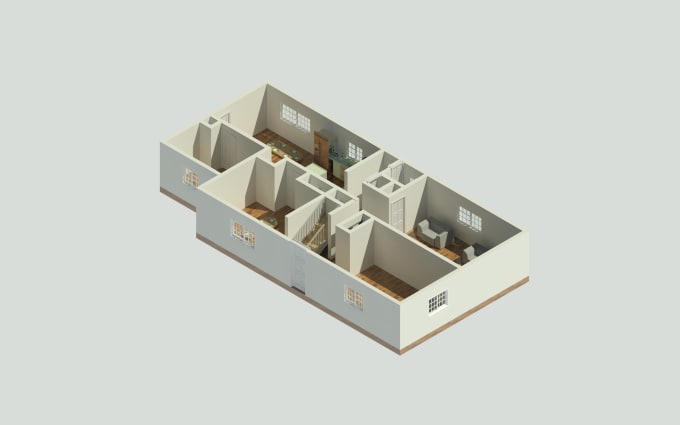
Our mobile app, OpalAi, allows anyone with an iPhone Pro or iPad Pro to capture a 3D floor plan in minutes. From there, we offer 2D floor plans and a 3D floor plan rendering plus the ability for CAD and BIM models as well.
There's no requirement for you to present a 2D sketch or utilize a measuring tape. All you have to do is scan with your device within minutes and press the submit button.
At this moment, the App is only available on devices with 3D LiDAR scanner.
Including: iPhone 12 Pro / Pro Max, iPhone 13 Pro / Pro Max, iPhone 14 Pro / Pro Max, iPad Pro
To ensure your requirements are met and provide optimal service, please feel free to contact us before placing an order. We can also arrange a call for further assistance.
Consider reaching out to us for a custom request:
Additionally, we offer services in SketchUp, Rhinno, FBX, GLTF, and USD formats.
Fiverr überprüft Freelancer in dieser Kategorie nicht. Bitte überprüfe die Qualifikationen und bespreche die Anforderungen vor der Bestellung mit dem Freelancer, einschließlich aller Präferenzen hinsichtlich der Nutzung von KI-Tools.
Sprachen
How to take a scan?
Before scanning: Turn on lights, open doors to scan multiple rooms. During scan: Move phone to capture, walk around slowly. Move up and down for ceilings, walls, floors. You can go back on your path and rescan. Scan corners, under desks. It's fine if you miss some spots.
Why the App crashes sometimes?
These can be the solutions to the problem: - Turn off the "Low Power Mode" while taking a scan. - If you have a big scan, try texturing it with the "Fast" mode first. After it's done, do the "HD" texture again. - If the App is still crashing, please contact us
| (1) | ||
| (0) | ||
| (0) | ||
| (0) | ||
| (0) |

antoineyj

Vereinigte Staaten
Exactly what I was looking for. By far the easiest process. I just had to download their app on my iphone then take a few minutes to scan my basement. Didn’t have to measure or sketch anything. Will order again
50 $
Preis
1 Tag
Dauer

| (1) | ||
| (0) | ||
| (0) | ||
| (0) | ||
| (0) |
antoineyj
Vereinigte Staaten
Exactly what I was looking for. By far the easiest process. I just had to download their app on my iphone then take a few minutes to scan my basement. Didn’t have to measure or sketch anything. Will order again
50 $
Preis
1 Tag
Dauer