Kategorien durchsuchen
Entdecken
Fiverr Pro
Deutsch
$
USD

Automatische Übersetzung
Ist dein Google Sheet langsam, zerbricht Formeln oder kostet Stunden bei manuellem Kopieren und Einfügen? Hör auf, Einnahmen durch Tabellenchaos zu verlieren.
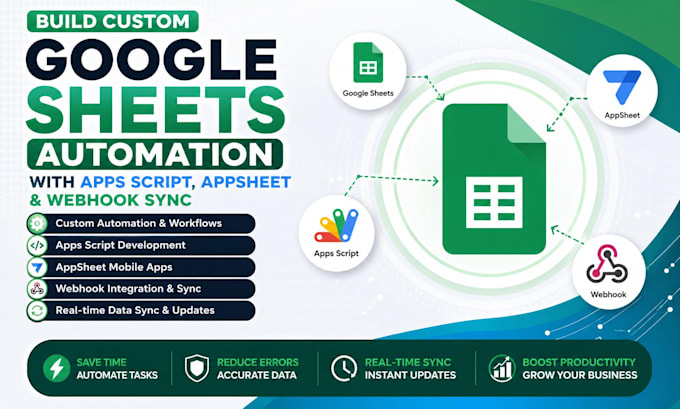
Ich bin ein Google Sheets Automatisierungs-Experte, der fragile Tabellen in schnelle, zuverlässige Geschäftssysteme mit Apps Script, AppSheet, Glide und Looker Studio verwandelt. Vom schnellen Formel-Repair bis zum vollständigen individuellen App auf deiner Tabelle liefere ich professionelle, hochwertige und garantierte Lösungen, die tatsächlich funktionieren.
Was du bekommst:
- Individuelle Apps Script Automatisierung & Trigger
- Webhook/API-Synchronisation (WooCommerce, Shopify, Stripe, CRM)
- AppSheet- oder Glide-Apps für Mobilgeräte/Web
- Looker Studio Dashboards mit Live-Daten-Integration
- Fehlerhafte Formeln & #REF!/#WERT!/#N/A Reparaturen
- Mehrtabellen-bezogene Datenstrukturierung
- Rollenbasierte Zugriffs- & Sicherheitskonfiguration
- Vollständige Video-SOP-Dokumentation
TOOLS
Kontaktiere mich vor der Bestellung, um die Anforderungen zu bestätigen und die passende Lösung zu sichern.
VoIP SIP Trunk and Telephony Specialist Fixing Broken Phone Systems Fast
Sprachen
Automatische Übersetzung
Automatische Übersetzung
Brauchst du Zugriff auf meinen gesamten Google Drive oder nur auf dieses eine Sheet?
Nur auf das eine Sheet, ich frage nie nach Vollzugriff auf den Drive. Du kannst eine einzelne Datei mit Bearbeitungsrechten teilen oder dein Sheet duplizieren und die Kopie teilen, wenn du das Original während der Entwicklung unberührt lassen möchtest.
Ich habe schon ein unordentliches, halbdefektes Sheet mit Jahren an Daten. Kannst du das reparieren, ohne von Grund neu anzufangen?
Ja, das ist eine meiner häufigsten Anfragen. Ich prüfe zuerst die bestehende Struktur, repariere defekte Formeln und Referenzen vor Ort und baue nur die Teile neu auf, die wirklich nicht mehr zu retten sind. Deine historischen Daten bleiben dabei erhalten.
Was passiert, wenn Google etwas ändert und deine Automatisierung später nicht mehr funktioniert?
Apps Script und die Plattformen, auf denen ich aufbaue (AppSheet, Glide, Looker Studio), werden von Google gepflegt und sind im Allgemeinen stabil. Falls eine Google-Änderung innerhalb von 30 Tagen nach Lieferung etwas kaputt macht, repariere ich es kostenlos im Rahmen der Liefergarantie.
Brauche ich ein bezahltes Google Workspace Konto dafür?
Nein, ein kostenloses persönliches Google-Konto reicht für die meisten Apps Script Automatisierungen und Formel-Reparaturen. Einige Funktionen von AppSheet/Looker Studio und höhere Script-Ausführungslimits profitieren jedoch von Workspace, und ich weise dich vorher darauf hin, falls dein spezieller Build das benötigt.
Können meine Teammitglieder ohne technische Vorkenntnisse die Tabelle nach der Automatisierung weiterhin normal nutzen?
Absolut, das ist das Ziel. Ich gestalte Automatisierungen so, dass sie im Hintergrund oder über einfache Buttons/Menüs laufen, sodass dein Team Daten wie immer eingeben kann, ohne die Skripte verstehen zu müssen.
Was, wenn meine Daten auf mehrere tausend Zeilen anwachsen, wird die Automatisierung langsamer oder bricht sie zusammen?
Ich plane die Automatisierung von Anfang an für dein erwartetes Wachstum, nutze effiziente Batch-Operationen statt langsamer Zell-zu-Zell-Schleifen. Wenn du schnelles Wachstum erwartest, teile mir die voraussichtliche Zeilenzahl vorab mit, damit ich die Architektur an die Google-Execution-Limits anpasse, anstatt später auf sie zu stoßen.
Kannst du mit Daten in Excel, Airtable oder einem anderen Tool statt Google Sheets arbeiten?
Ja, ich kann Excel- oder Airtable-Daten in Google Sheets migrieren oder Sheets mit diesen Tools verbinden, um eine Synchronisation zu ermöglichen, wenn eine vollständige Migration nicht praktikabel ist. Sag mir vor der Bestellung, welche Plattform du nutzt, damit ich den Umfang richtig einschätzen kann.
Muss ich programmieren können, um das nach deiner Fertigstellung zu warten?
Nein, die tägliche Nutzung erfordert kein Programmieren. Ich dokumentiere alle Einstellungen, die du wahrscheinlich anpassen musst (wie eine E-Mail-Adresse in einem Trigger), in verständlicher Sprache. Für alles darüber hinaus stehe ich gern für eine kurze Nachbereitung bereit.